Persistent storage is essential for Kubernetes workloads that need to retain data beyond the lifecycle of individual pods. This tutorial explains the concepts of Persistent Volumes (PV), Persistent Volume Claims (PVC), and dynamic volume provisioning in Amazon EKS using Amazon EBS. You'll learn how Kubernetes abstracts storage management, create a custom StorageClass, dynamically provision EBS-backed volumes, bind PVCs to PVs, and mount persistent storage into pods. Through a hands-on walkthrough, the guide demonstrates how AWS EKS automates storage provisioning, enabling applications to use durable and scalable storage without manual volume management.
Pods in Kubernetes need to store data which gets lost if kubelet restarts the pod or pods are intentionally deleted or recreated.
Empty Dir volume or Host path volume use the local disk of the node to mount the volume. Cloud volumes like AWS EBS mount the disk in the same manner but with different implementation.
In this tutorial we will learn the concept of Persistent Volume and Persistent Volume Claim and its implementation on AWS EKS using EBS.
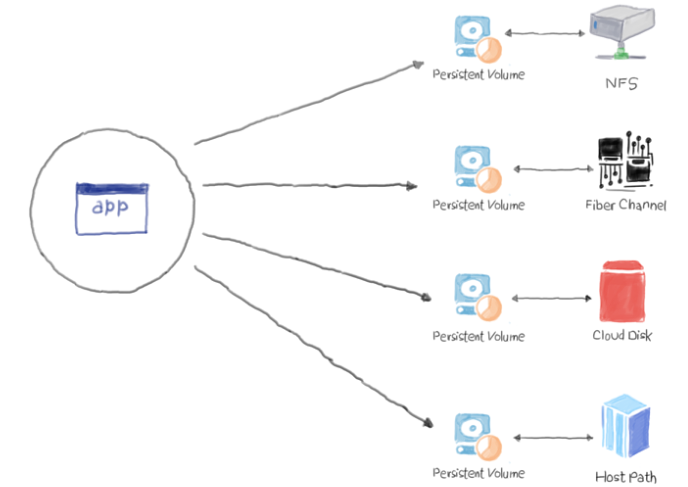
Persistent volume (PV)
As we saw that Empty Dir or Host path are tightly coupled with pods as they use the local disk of the node to mount the volume. It is a piece of storage in the cluster that has been provisioned by an administrator or dynamically provisioned using Storage Classes.
Important things to remember is:
- It is a resource in the cluster just like a node is a cluster resource.
- PVs are volume plugins like Volumes, but have a lifecycle independent of any individual Pod that uses the PV.
- PV is used in the same manner as emptyDir or hostPath but not provisioned by pods.
- It removes provisioning burden from developers to admin.
Persistent volume claim (PVC)
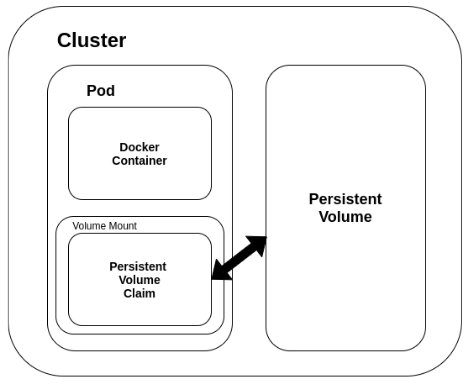
Cluster administrator creates the volumes as we saw previously and now pods can access them through PVC. It’s a level of abstraction between the volume and its storage mechanism. Once PVC is created requirements of your application only matters eg. space, type, permission.
We can also give different level of access permission in PVC.
- ReadWriteOnce - where only one node is allowed access to the volume.
- ReadOnlyMany - where one is allowed full access and other nodes are allowed read-only permission
- ReadWriteMany - for volumes that can be shared among many nodes and all of them have full access to it
Dynamic Volume Provisionining in AWS EKS using EBS
- Create a StorageClass with the following settings.
$ cat storage-class.yaml
kind: StorageClass
apiVersion: storage.k8s.io/v1
metadata:
  name: aws-standard
  annotations:
    storageclass.kubernetes.io/is-default-class: "true"
provisioner: kubernetes.io/aws-ebs
parameters:
  type: gp2
  fsType: ext4
- Create StorageClass with
kubectl applycommand.
$ kubectl apply -f storage-class.yaml
storageclass.storage.k8s.io/aws-standard created
- Explain the default storageclass
$ kubectl get storageclass
NAME                     PROVISIONER             RECLAIMPOLICY   VOLUMEBINDINGMODE      ALLOWVOLUMEEXPANSION   AGE
aws-standard (default)   kubernetes.io/aws-ebs   Delete          Immediate              false                  37s
gp2 (default)            kubernetes.io/aws-ebs   Delete          WaitForFirstConsumer   false                  112m
- Create a persistentvolumeclaim with the following settings and show that new volume is created on aws management console.
$ cat pvc.yaml
apiVersion: v1
kind: PersistentVolumeClaim
metadata:
  name: pv-claim
spec:
  accessModes:
    - ReadWriteOnce
  resources:
    requests:
      storage: 3Gi
  storageClassName: aws-standard
$ kubectl apply -f pvc.yaml
persistentvolumeclaim/pvc created
- List the pv and pvc and explain the connections.
$ kubectl get pv
NAME                                       CAPACITY   ACCESS MODES   RECLAIM POLICY   STATUS   CLAIM                     STORAGECLASS   REASON   AGE
pvc-250719ae-36b8-441a-ad04-f6f69c1a11f0   3Gi        RWO            Delete           Bound    default/pv-claim   aws-standard            18s
$ kubectl get pvc
NAME              STATUS   VOLUME                                     CAPACITY   ACCESS MODES   STORAGECLASS   AGE
pv-claim   Bound    pvc-250719ae-36b8-441a-ad04-f6f69c1a11f0   3Gi        RWO            aws-standard   2m30s
- Create a pod with the following settings.
$ cat dynamic-storage-aws.yaml
apiVersion: v1
kind: Pod
metadata:
  name: test-eks-dynamic-storage
  labels:
    app : web-nginx
spec:
  containers:
  - image: nginx:latest
    ports:
    - containerPort: 80
    name: test-aws
    volumeMounts:
    - mountPath: /usr/share/nginx/html
      name: aws-pd
  volumes:
  - name: aws-pd
    persistentVolumeClaim:
      claimName: pv-claim
$ kubectl apply -f dynamic-storage-aws.yaml
pod/test-eks-dynamic-storage created
- Enter the pod and see that ebs is mounted to /usr/share/nginx/html path. As it can be seen EBS has been mounted to the path and once we are done we can delete this.
$ kubectl exec -it test-aws -- bash
root@test-eks-dynamic-storage:/# df -kh
Filesystem      Size  Used Avail Use% Mounted on
overlay         8.0G  4.3G  3.7G  54% /
tmpfs            64M     0   64M   0% /dev
tmpfs           2.0G     0  2.0G   0% /sys/fs/cgroup
/dev/xvda1      8.0G  4.3G  3.7G  54% /etc/hosts
shm              64M     0   64M   0% /dev/shm
/dev/xvdbq      2.9G  9.0M  2.9G   1% /usr/share/nginx/html
tmpfs           2.0G   12K  2.0G   1% /run/secrets/kubernetes.io/serviceaccount
tmpfs           2.0G     0  2.0G   0% /proc/acpi
tmpfs           2.0G     0  2.0G   0% /proc/scsi
tmpfs           2.0G     0  2.0G   0% /sys/firmware
root@test-eks-dynamic-storage:/#
- Delete the storageclass that we created once done.
$ kubectl get storageclass
NAME                     PROVISIONER             RECLAIMPOLICY   VOLUMEBINDINGMODE      ALLOWVOLUMEEXPANSION   AGE
aws-standard (default)   kubernetes.io/aws-ebs   Delete          Immediate              false                  16m
gp2 (default)            kubernetes.io/aws-ebs   Delete          WaitForFirstConsumer   false                  39m
$ kubectl delete storageclass gp2
storageclass.storage.k8s.io "gp2" deleted
$ kubectl get storageclass
NAME                     PROVISIONER             RECLAIMPOLICY   VOLUMEBINDINGMODE   ALLOWVOLUMEEXPANSION   AGE
aws-standard (default)   kubernetes.io/aws-ebs   Delete          Immediate           false                  16m
- Delete the pod as well once done
$ kubectl delete -f dynamic-storage-aws.yaml
pod "test-eks-dynamic-storage" deleted
Conclusion
As we saw Kubernetes volume provides an easy solution to solve the problem of ephemeral nature of storage in the container and secondly allows sharing files between containers.